Buying and budgeting
Plan your exit while the vendor is still trying to win you
An exit checklist for numbers, records, workflows, credentials, transition work, and deletion evidence.
Published · Collection dates are retrospective editorial dates.
The easiest time to discuss leaving a vendor is before you depend on it. The service is still being defined, your team can compare alternatives, and the supplier has a reason to answer practical questions.
An exit plan is not a prediction that the relationship will fail. It is part of making the relationship manageable. Your business should know how customer work continues if the product changes, the price stops making sense, or the arrangement no longer fits.
For an AI workflow, the exit involves more than exporting transcripts. You may need phone numbers, business records, configuration, credentials, policy content, and a way to handle requests already in progress.
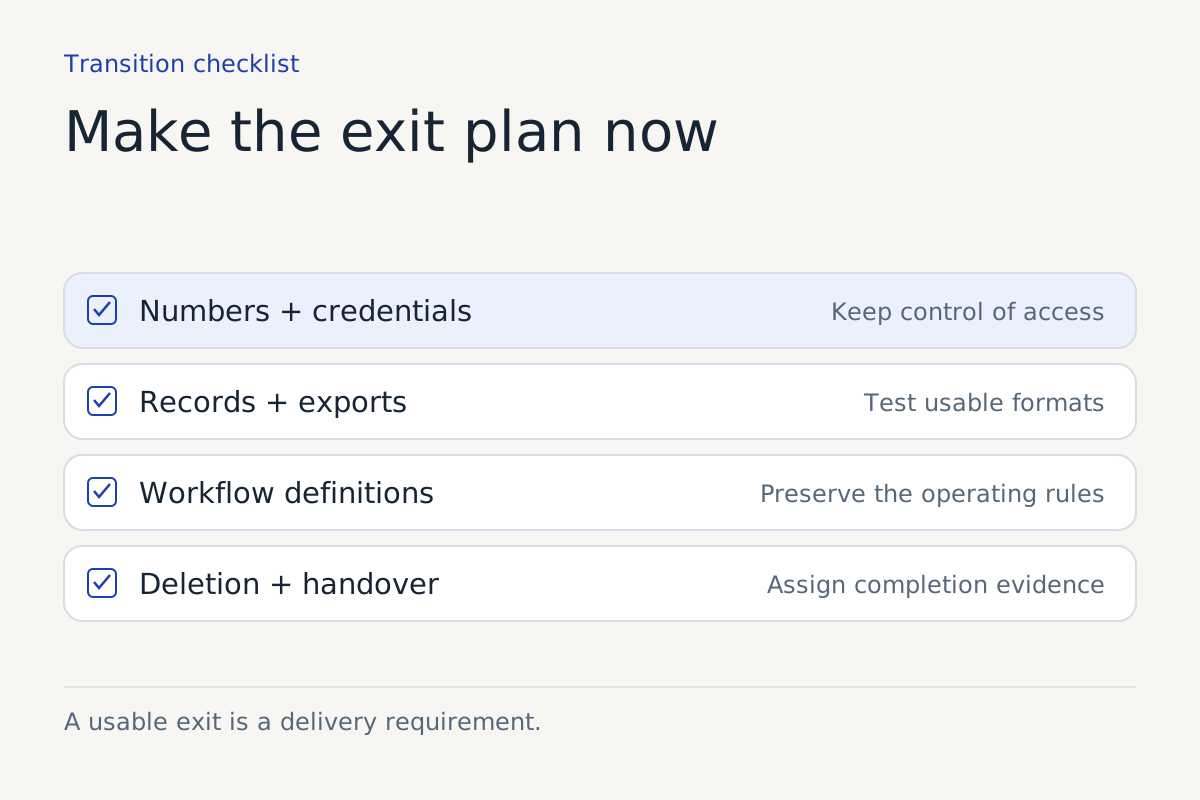
Identify what you must be able to take with you
List the assets the operation relies on, then record who owns or controls each one. Avoid assuming that an asset belongs to you simply because your customers encounter it.
| Asset | Question to settle before signing |
|---|---|
| Phone numbers | Who controls them, and what is the transfer process? |
| Customer records | Which fields can be exported in a usable format? |
| Record identifiers | Can you connect an exported interaction to the destination record? |
| Knowledge content | Can you retrieve your approved content and its version history? |
| Workflow definitions | What configuration is portable, documented, or proprietary? |
| Credentials | Which accounts and keys belong to your organization? |
| Pending work | How will open requests be identified and assigned during transition? |
| Deletion evidence | What confirmation and limitations will the supplier provide? |
The answer may differ by asset. A vendor can reasonably own its software while your business needs a usable record of its own process and customer work. Negotiate the distinction explicitly rather than discovering it during a dispute.
Test the export before there is pressure
Ask for a sample export containing fictional records. Open it with the person who will use it. Check whether the file includes dates, timezones, statuses, customer references, action results, and enough context to distinguish completed work from pending work.
A folder of transcripts may be an archive, but it may be a poor migration format. If your staff need structured request fields, confirm those fields survive export. If links expire or attachments are separate, document how they will be retrieved.
Google Calendar's event-creation guide illustrates the importance of external record identifiers in connected workflows. Its documentation describes supplying an event ID to synchronize with a local record. For your exit plan, ask how the vendor preserves the relationship between an interaction and the records it created.
Do not infer that your vendor uses that mechanism. Inspect its actual export and integration records.
Keep your process understandable without the product
Maintain a plain-language version of the workflow: starting events, approved sources, allowed actions, exclusions, handoffs, and failure procedures. Store it somewhere your organization controls.
This is not an attempt to reproduce proprietary implementation details. It is a record of how your business intends customer work to happen. A replacement supplier or internal team should not have to reverse-engineer your policies from old conversations.
Keep an inventory of integrations and access. Name the business owner for each account, the permission granted, and the steps for revocation. Prefer organizational accounts where appropriate rather than a staff member's personal login becoming the hidden foundation of a production workflow.
Rehearse the transition of pending work
A clean cutoff rarely exists. Some callers will have left messages. Some actions will be awaiting confirmation. Some conversations will reopen after the service changes.
Choose a transition owner and define how work is reconciled. Capture an inventory of open requests at the cutoff, assign each one, and confirm the destination received it. Prevent both systems from independently performing the same action during overlap.
Test the fallback with safe data. Check the customer-facing message, queue access, and staff instructions. A fallback number or inbox is useful only if someone monitors it and knows what to do.
Agree on assistance, timing, and deletion
Ask what transition help is included, what costs extra, and what deadlines apply. Clarify notice periods, export windows, account access after termination, and the process if termination follows an incident rather than a planned migration.
For a separate healthcare context, HHS's cloud-computing guidance discusses return or destruction of protected health information at termination and the handling of situations where that is infeasible. Relevant healthcare reviewers should assess how those obligations apply to the actual parties and data.
For any industry, get an accurate description of deletion across production storage, logs, backups, and subprocessors. Coordinate it with your own retention obligations and connected-system records. Exporting data and deleting data are separate operations with separate evidence.
Make the exit plan part of ordinary ownership
Review the plan when you add another integration, change a phone route, or expand permissions. An exit document that describes the first pilot may be useless after the system becomes central to several workflows.
Keep the plan proportionate. A small informational assistant needs less transition planning than a service that creates appointments and updates accounts. The required detail follows the dependencies and consequences.
A supplier that can explain portability, transition, and deletion gives you a relationship you can operate with greater clarity. You can then choose to stay because the service continues to earn its place, with a workable route available if that changes.
Sources
For help defining this workflow, explore our workflow integration work.
Keep reading