Implementation and ownership
“It integrates” is the start of the conversation
Acceptance checks for field mapping, permissions, duplicates, partial failures, and verifying the resulting business record.
Published · Collection dates are retrospective editorial dates.
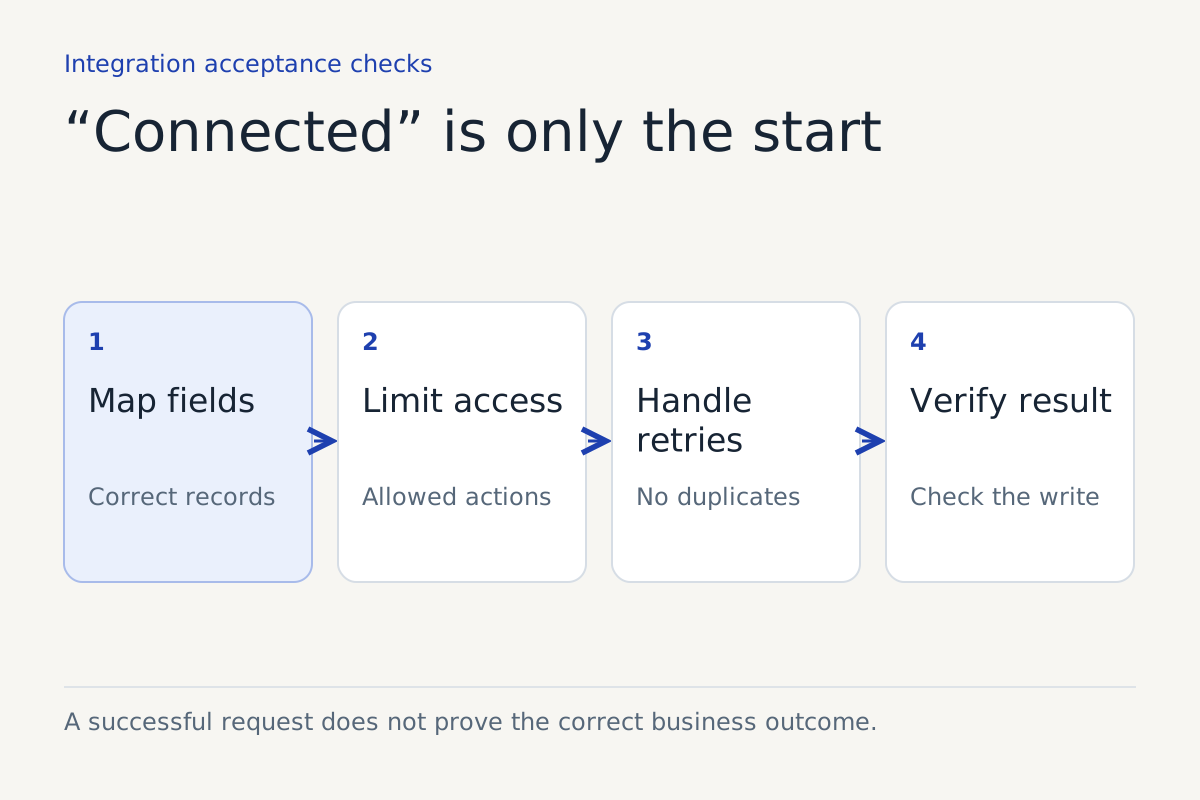
A connector logo tells you that two products have some way to communicate. It does not tell you whether the integration can complete your business task correctly.
“It integrates with our calendar” might mean it can read availability, create events, update events, or only send a booking link. “It integrates with our CRM” might mean it writes a note but cannot assign an owner or update a status. Those are different capabilities with different operating consequences.
Start the integration conversation with a transaction your team recognizes. Then inspect each step from customer request to resulting record.
Define the transaction in business terms
For a hypothetical appointment workflow: create one approved appointment, for the right customer, service, location, staff member, and time, then give the customer an accurate confirmation.
Each word carries a requirement. “One” raises duplicate prevention. “Approved” raises authority. “Right customer” raises identity and matching. “Time” raises timezone and duration. “Confirmation” raises the question of what the system actually knows happened.
The test should cover the whole statement. A successful connection or API response is only part of the evidence.
Inspect field mapping with actual examples
Ask to see the fields read and written. Identify required fields, optional fields, defaults, and transformations. A default value can create plausible-looking records that are wrong for the request.
| Field or behavior | Acceptance question |
|---|---|
| Customer identity | How is the correct person distinguished from a similar name? |
| Service type | What happens when the customer's description does not match a category? |
| Location | Is it explicit, inferred, or defaulted? |
| Date and time | Which timezone governs input, storage, and customer confirmation? |
| Duration | Which approved rule determines it? |
| Assignment | Does a real person or queue receive ownership? |
| Status | Does it distinguish requested, confirmed, failed, and canceled work? |
| External identifier | Can you trace the conversation to the resulting record? |
Use safe test data. Include a corrected detail and a missing required field. Check the destination record directly rather than reading only the integration's own success screen.
Grant the permissions the transaction needs
Read permission is not write permission. Permission to create an event is not permission to delete it. Review the actual access granted and whether the workflow can be limited to the relevant records or calendar.
Google Calendar's event-creation guide documents write access and authorization requirements for creating events. It also describes required event details. That is useful technical grounding, but your acceptance test still needs to verify the business rules applied before the event is created.
Ask who owns the credentials, how they are rotated or revoked, and what happens when authorization expires. Staff should receive a visible failure signal and a recovery route, not discover days later that requests stopped reaching the calendar.
Test the uncomfortable middle states
The difficult failure is often not a clean rejection. The destination may create a record while the caller-facing system times out waiting for confirmation. A blind retry can then create a duplicate.
Ask the supplier how it handles an uncertain result. Does it look up the original operation, reuse a stable request identifier where supported, or place the action into reconciliation? Do not accept “we retry automatically” without understanding how repeated actions are prevented.
Google's event guide explains that supplying an event ID can help prevent duplicate creation after a failure and support synchronization with a local record. That is one documented mechanism. It does not establish that your connector uses it or that every destination supports the same approach.
Also test partial completion. A calendar event might exist while the CRM update fails. Decide whether the request is complete, needs repair, or needs a person to reconcile it. The customer-facing message should match that decision.
Verify what exists after the action
For important writes, inspect the resulting record or another reliable acknowledgement. Confirm the important fields and store the identifier needed for investigation. The appropriate verification depends on the destination and the consequence of an error.
A technical success response can still contain the wrong location, a default duration, or an incorrect assignment. Acceptance should compare the intended transaction with the actual business record.
Test a subsequent change as well. If the customer corrects the time, does the integration update the original record or create another? If the appointment is canceled, do linked records reflect the change? Make sure the supported lifecycle matches what the business intends to offer.
Build a compact acceptance set
Use named cases with expected outcomes:
- A complete standard request creates exactly the intended record.
- A missing field produces clarification without an unauthorized guess.
- A correction replaces the relevant value.
- A rejected permission produces a visible, recoverable failure.
- An uncertain response does not create an uncontrolled duplicate.
- A partial failure assigns reconciliation to an owner.
- A prohibited action remains blocked.
- A completed action can be traced from interaction to destination record.
Keep the evidence and retest when permissions, mappings, or connectors change. An integration is an ongoing dependency, not a setup box that stays checked forever.
The buying and implementation question is whether this integration supports your transaction under realistic conditions. Once that is clear, the connector logo becomes useful context rather than the whole answer.
Sources
For help defining this workflow, explore our workflow integration work.
Keep reading